
Seenu Salon OS · SMS Opt-in
How people opt in to Salon OS texts.
For carrier and messaging-provider review: how a conversation starts, the notice shown where the number is published, and the messages that follow.
Customers: the customer texts first, or says yes on the call
- The salon publishes its Seenu Salon OS number - on its website, Google Business Profile, signage or printed brochure - together with the notice below. For the demo line, the notice appears under (551) 310-2878 on seenutech.com/salonos.
- The customer starts the conversation by texting the number. That message is their request to be answered.
- Shelly replies within that conversation. Her first reply names the program and how to stop: "- Seenu Salon OS. Reply STOP to opt out."
- If the customer books by text, the confirmation reply adds: "We'll text you a reminder the day before and an hour before. Reply NO REMINDERS to turn them off." Those two reminders are the only texts that follow for that booking.
- On a phone call, right after a booking is confirmed, Shelly asks: "Would you like a text confirmation, plus reminders the day before and an hour before?" Only a clear yes turns texts on; the answer and its time are stored with the customer record. The confirmation text names the salon and how to stop.
- STOP, START and HELP are handled by our messaging provider (Twilio). A customer who replies STOP receives no further texts.
Salon staff: the owner records each stylist's consent
- A stylist gives the salon owner their mobile number and agrees to receive booking texts.
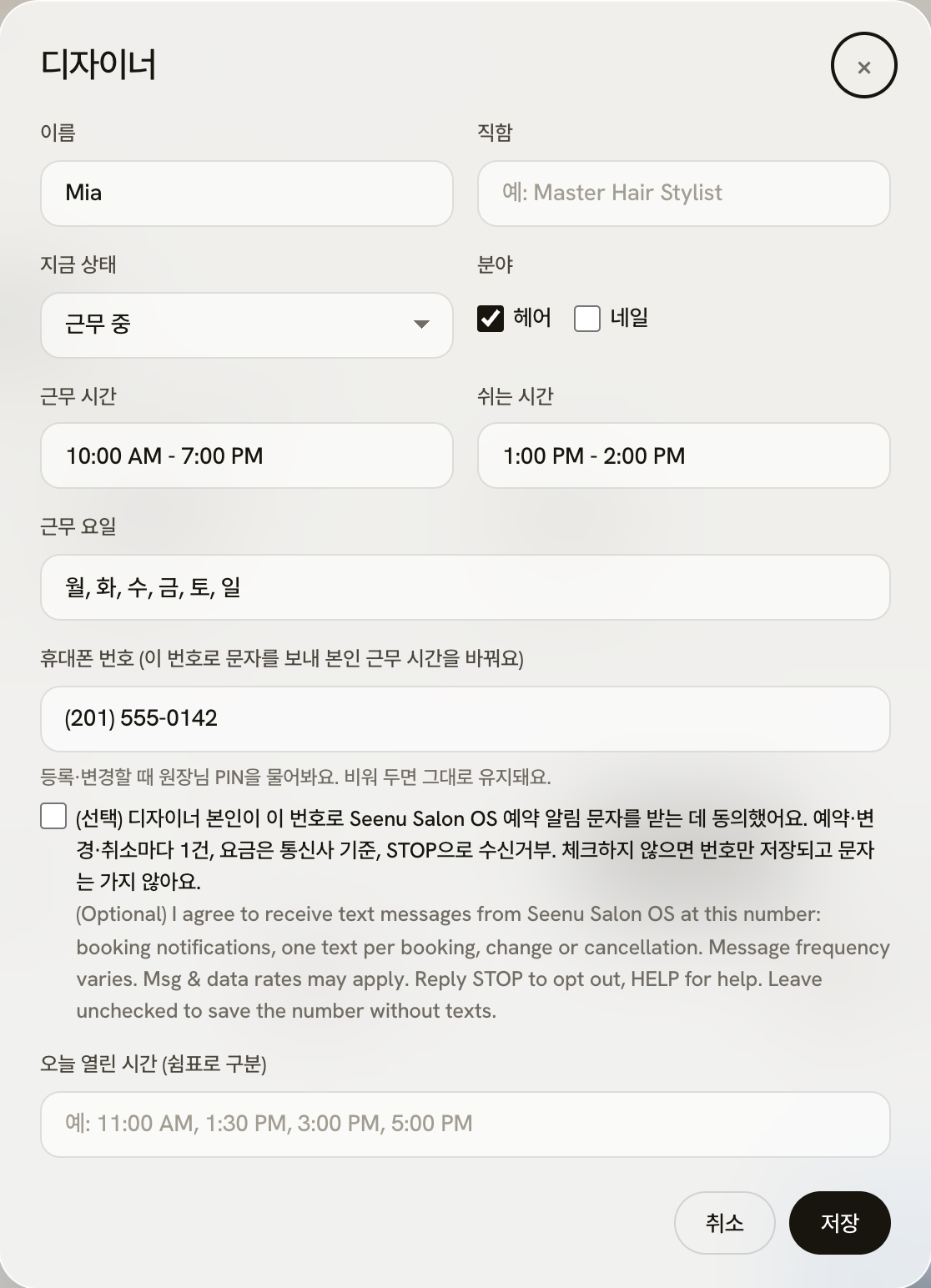
- The owner saves the number in the Seenu Salon OS dashboard, behind the owner PIN. The form has a separate, optional consent checkbox: "I agree to receive text messages from Seenu Salon OS at this number: booking notifications, one text per booking, change or cancellation. Message frequency varies. Msg & data rates may apply. Reply STOP to opt out, HELP for help." The box is never pre-checked, and the number can be saved without it; then no texts are sent to that stylist.
- The stylist then receives one text per booking made, moved, changed or cancelled for them, and can reply STOP at any time.
- The salon owner can also turn on new-booking texts to their own mobile number, with the same kind of unchecked consent box: "I agree to receive text messages from Seenu Salon OS at this number: a notification for each new booking. Message frequency varies. Msg & data rates may apply. Reply STOP to opt out, HELP for help."
The notice shown with the number
Text this number to ask about open times or to book. By texting, you agree to receive replies from Seenu Salon OS about your request and, if you book, a reminder the day before and an hour before your appointment. Message frequency varies. Msg & data rates may apply. Reply STOP to opt out, HELP for help. Consent is not a condition of purchase. Terms: seenutech.com/salonos/legal/sms-terms · Privacy: seenutech.com/salonos/legal/privacy
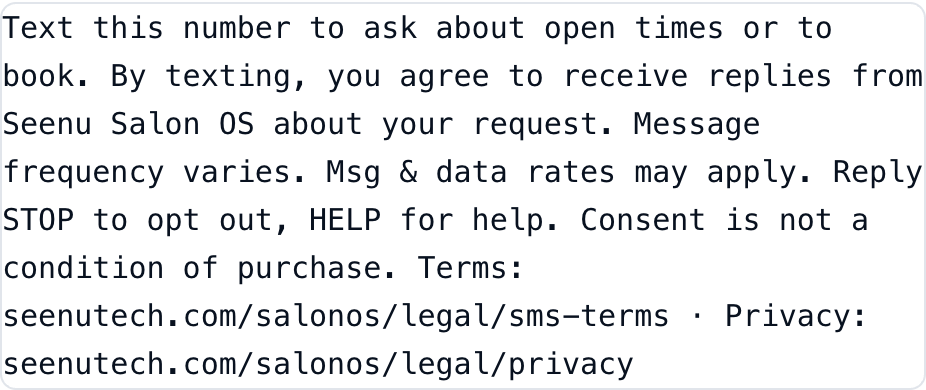
Live under the demo number on seenutech.com/salonos
Sample messages
Hi, this is Bella Studio. Alex has 3:00, 3:30, 4:00 and 4:30 PM open tomorrow for a digital perm. Which time works for you? - Seenu Salon OS. Reply STOP to opt out.
You're booked: Fri 10/23 at 3:00 PM, digital perm with Alex, $160. Text us here if anything changes.
[Bella Studio] Jane, you're booked: Tue, 10/27 2:00 PM, Men's Haircut with Alex. We'll text a reminder the day before and 1 hour before. To change or cancel, call or text this number. Reply STOP to opt out.
[Bella Studio] Reminder: Men's Haircut with Alex tomorrow, Tue, 10/27 2:00 PM. To change or cancel, call or text this number. Reply STOP to opt out.
[Bella Studio] New booking: 10/23 (Fri) 3:00-5:30 PM. Customer: Jane / 201-555-0142. Service: Digital Perm. Booked by text. Reply STOP to opt out.