Seenu Store Ops · a private system for one restaurant

Your own system.
Your numbers never leave your store.

Your staff count, close and photograph on an iPad or phone. You check, dig in and act from yours. Built and run for your restaurant only, from $129 a month all-in, after one setup that includes a week of us working in your store.

Seenu Store Ops - The same dashboard on a phone.
You, on your phone
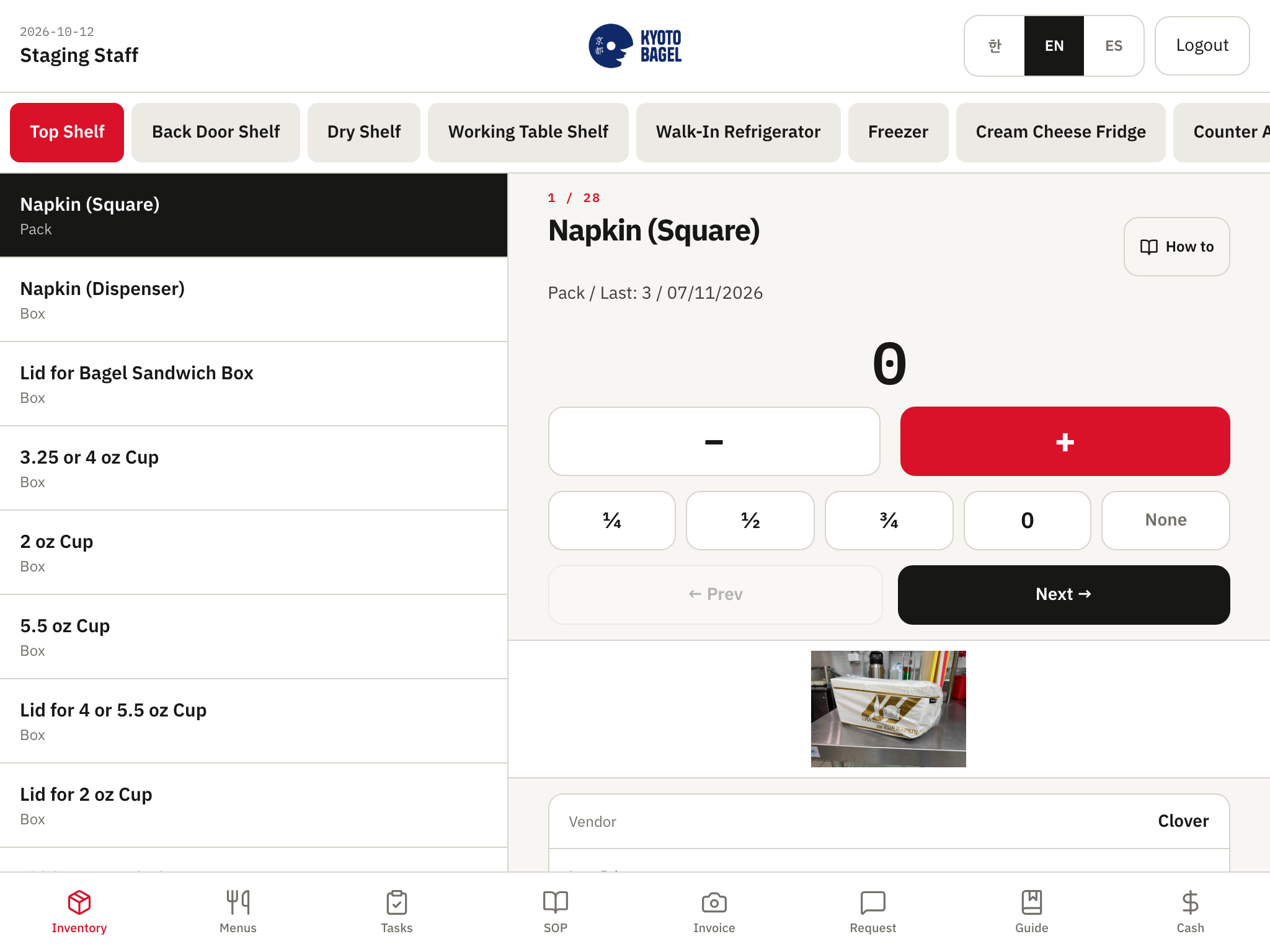
Seenu Store Ops - Inventory count by shelf, with ¼ ½ ¾ fractions.
Your staff, on the counter iPad

Not a shared platform

  • One private database and one private deployment per restaurant.
  • Nothing pooled, benchmarked, resold, or shown to any other business.
  • You can take it all with you: code and full database within 7 days of cancelling.
Our own store

We run this in our own restaurant in Fort Lee, NJ — ask for a live walkthrough.

What you see from your phone

Seventeen screens. See, investigate, act.

Email and password on any phone or laptop. Every screen works on a phone; wide tables swipe sideways. Staff feed it from the counter; you never type a count. Screens show Kyoto Bagel, a sample store on the same build.

See

Open the app, know where the day stands.

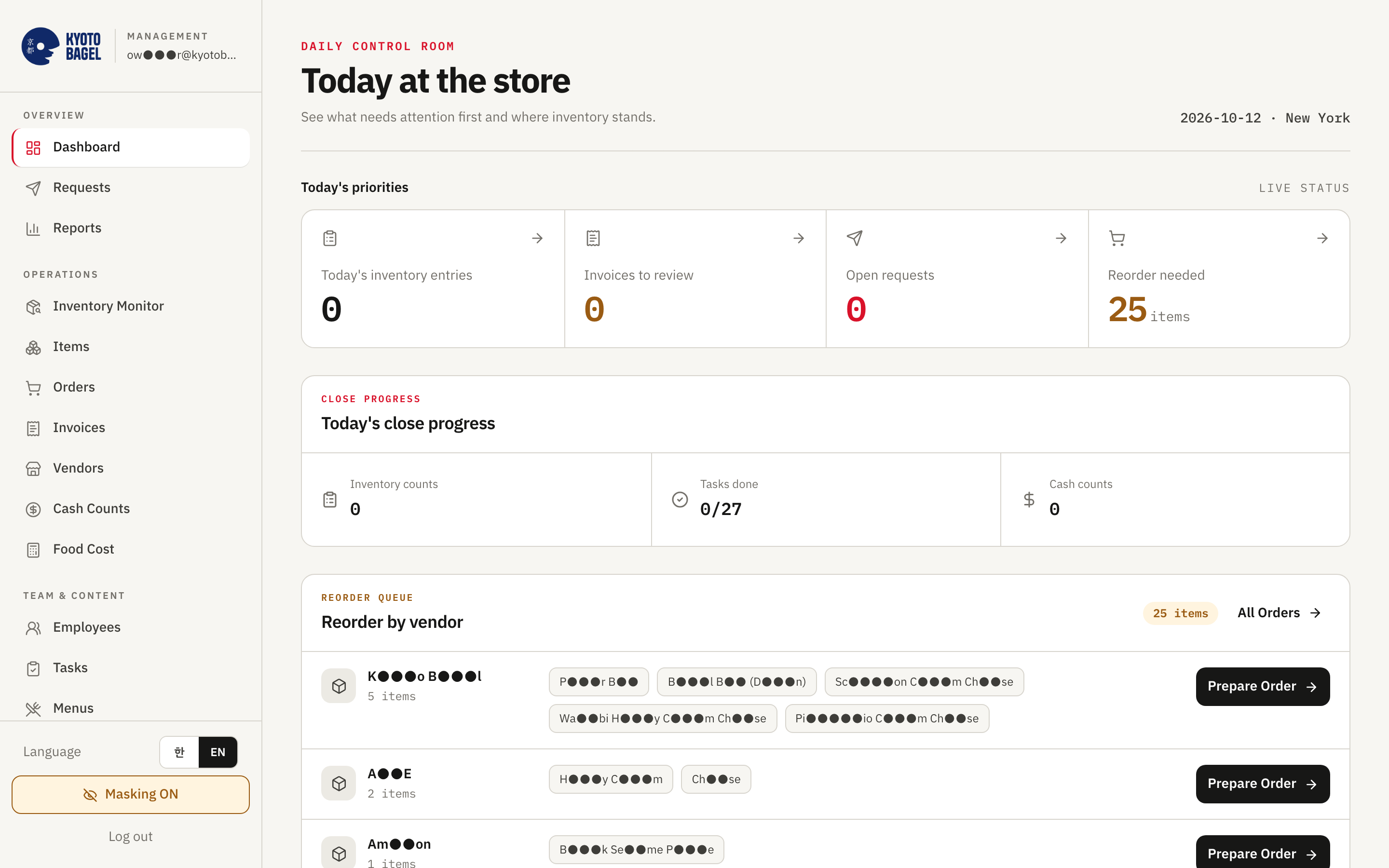
Seenu Store Ops owner dashboard - Dashboard

Dashboard

  • Four tiles: counts submitted today, invoices waiting, open requests, items to reorder.
  • Close progress: counts, tasks done X of Y, cash counts.
  • Price watch: up to 8 items whose invoice price rose, old → new, +%.
  • Usage signal: items being used unusually fast.
  • Who submitted counts today and when.
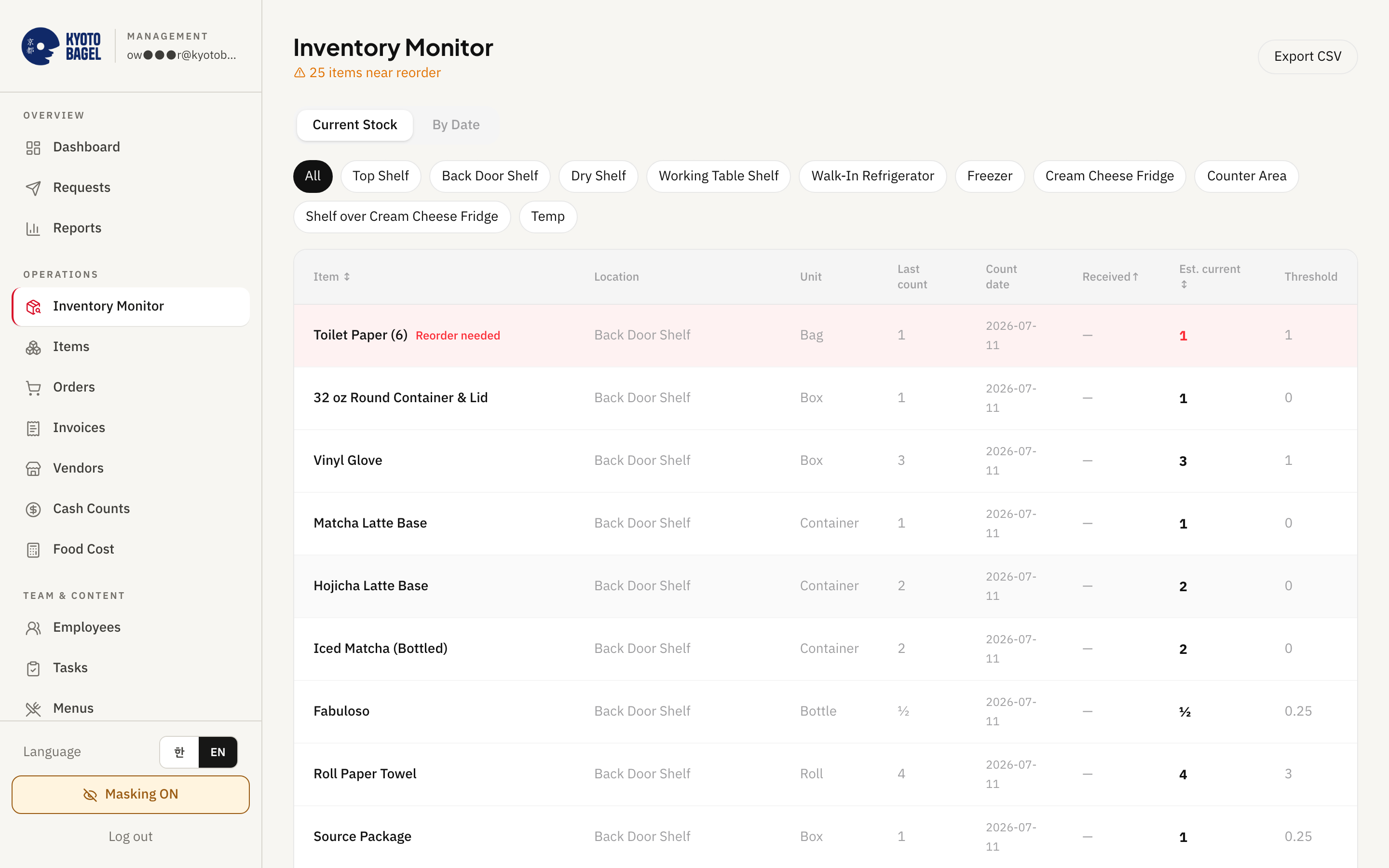
Seenu Store Ops owner dashboard - Inventory monitor

Inventory monitor

  • One row per item: last count, date, received since, estimated on hand, reorder threshold.
  • Low items tinted red; "N items near reorder" at the top.
  • By-date view: what was counted on any day and by whom; filter by shelf.
  • Export the current view to CSV.
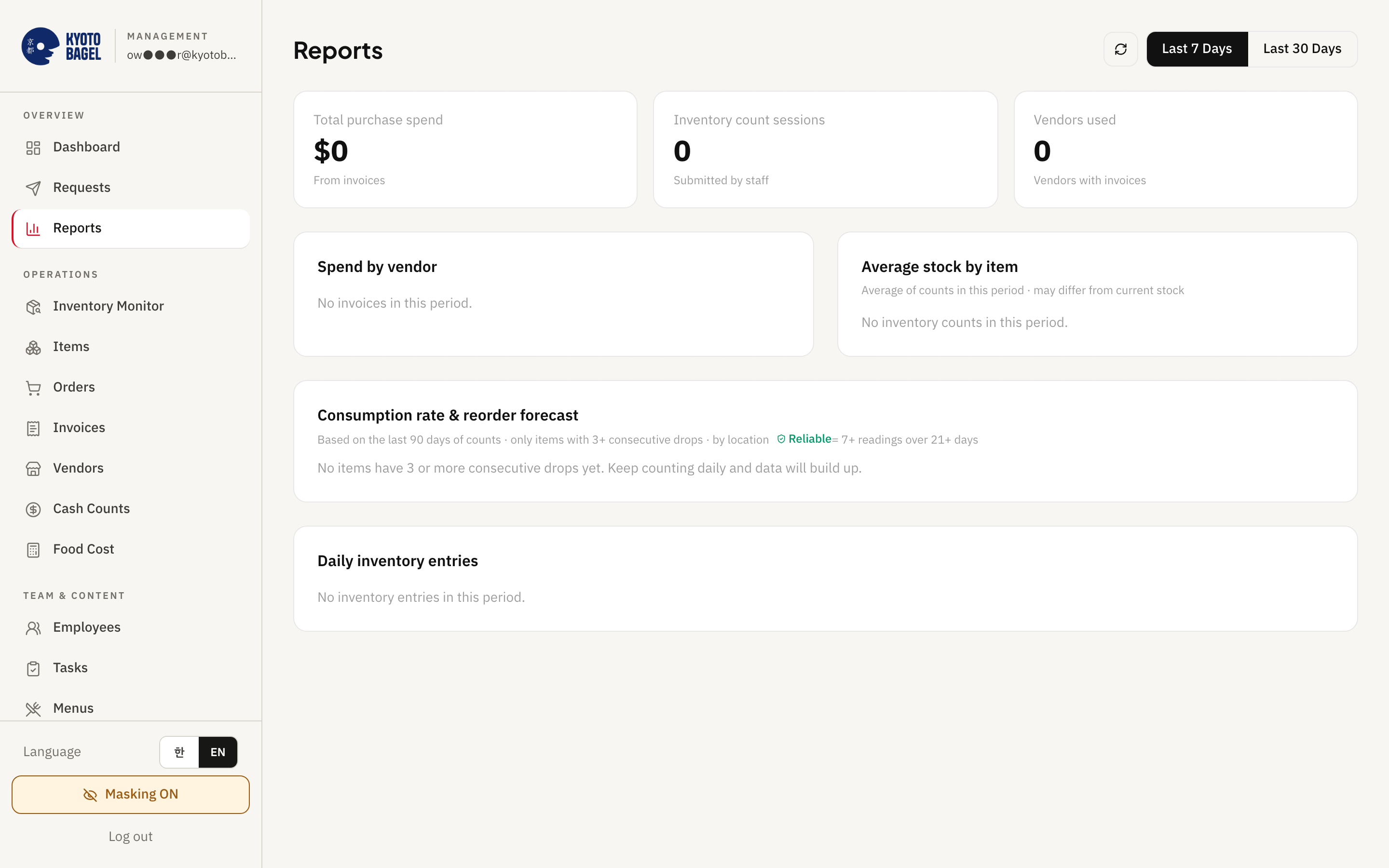
Seenu Store Ops owner dashboard - Reports

Reports

  • Last 7 or 30 days: purchase spend, counts, vendors bought from, spend by vendor.
  • 90-day consumption rate per item with "reorder in N days" (red ≤3, orange ≤7, amber ≤14).
  • A "reliable" mark once an item has enough count history.
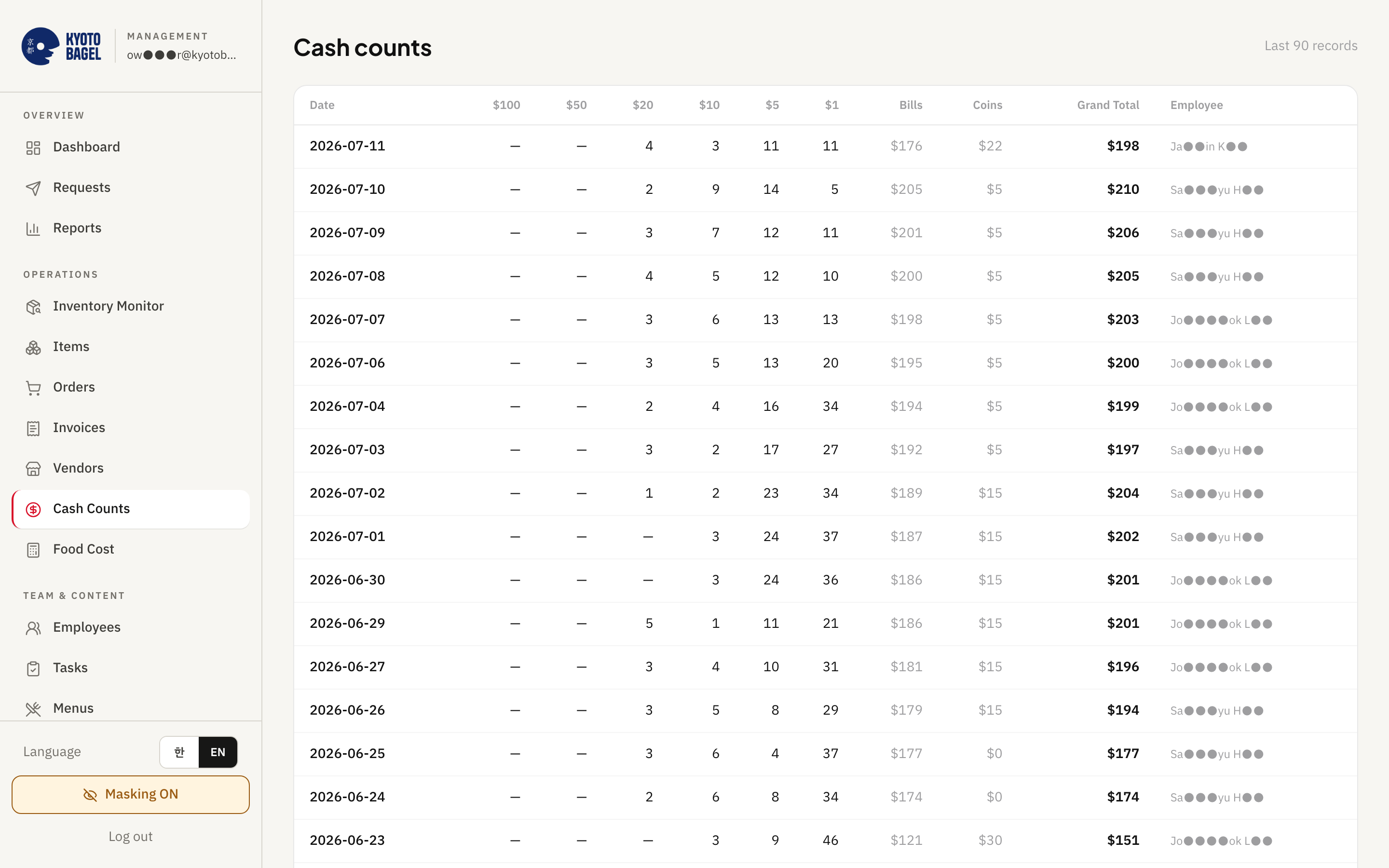
Seenu Store Ops owner dashboard - Cash counts

Cash counts

  • The last 90 closes: bills by denomination, coin rolls, grand total, employee.
  • Each close carries who counted and when.
  • Exported to a Google Sheet row automatically (Plus and Pro).

Investigate

When a number looks off, the history is one tap away.

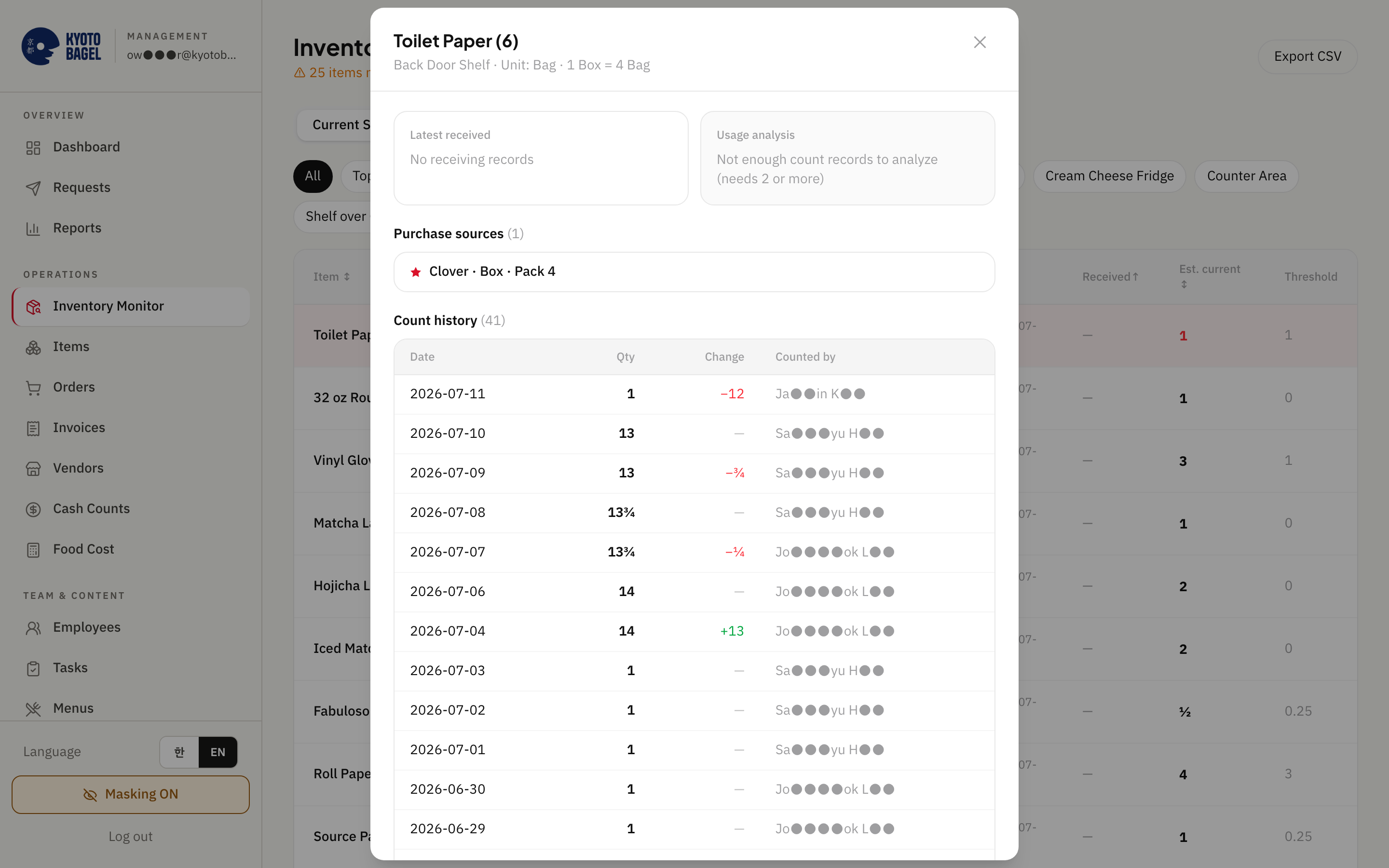
Seenu Store Ops owner dashboard - Item history

Item history

  • Last delivery, usage per day / week / month, "order about every N days".
  • Main and backup vendors with their prices.
  • Full count history with who counted; last 20 deliveries.
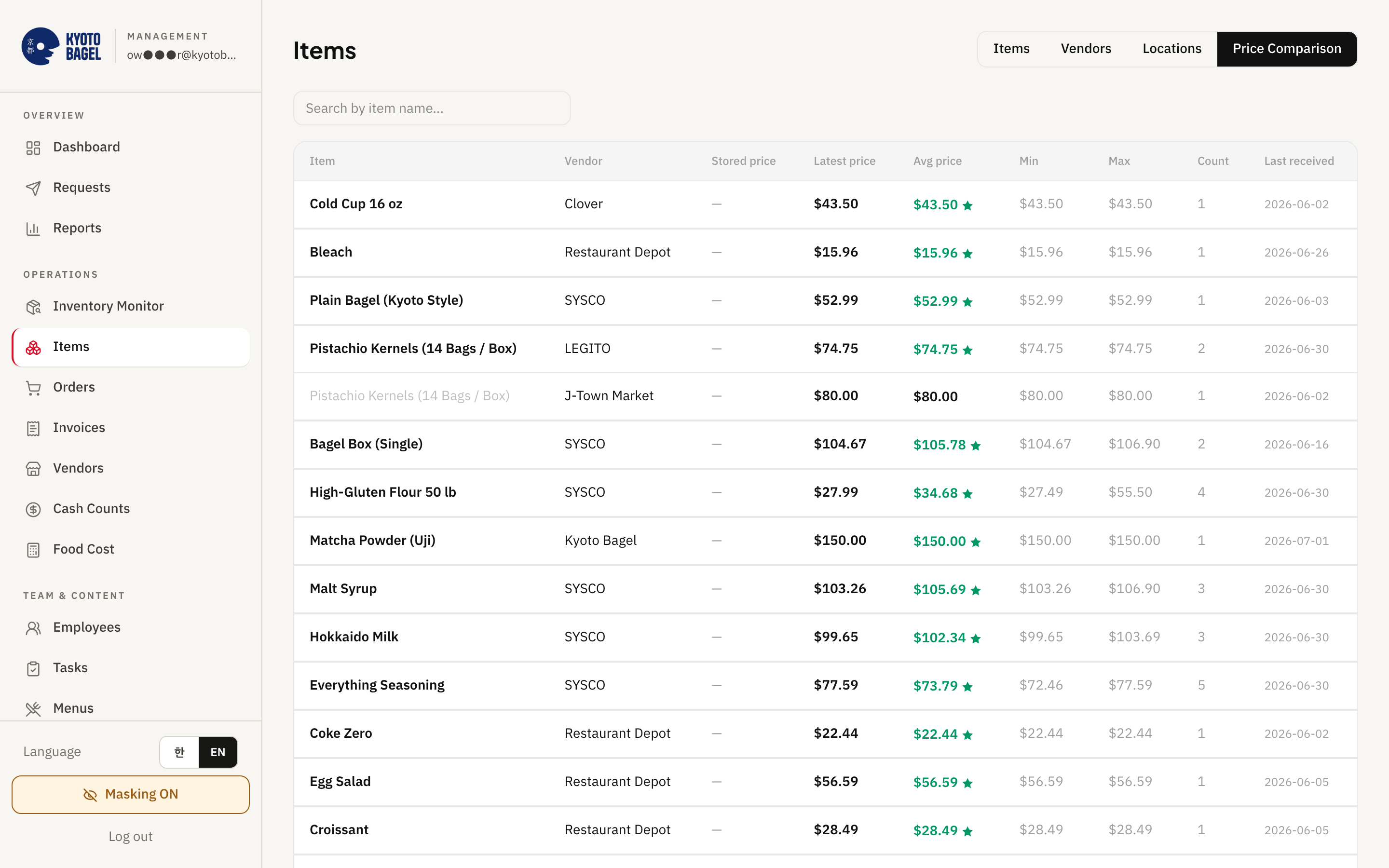
Seenu Store Ops owner dashboard - Price comparison

Price comparison

  • Per item and vendor: saved, latest, average, lowest, highest price; purchases; last delivery.
  • ★ marks the cheapest vendor for each item.
  • Price watch flags a rise of 10% or more against the typical of the last 6 purchases - a signal only, nothing changes by itself.
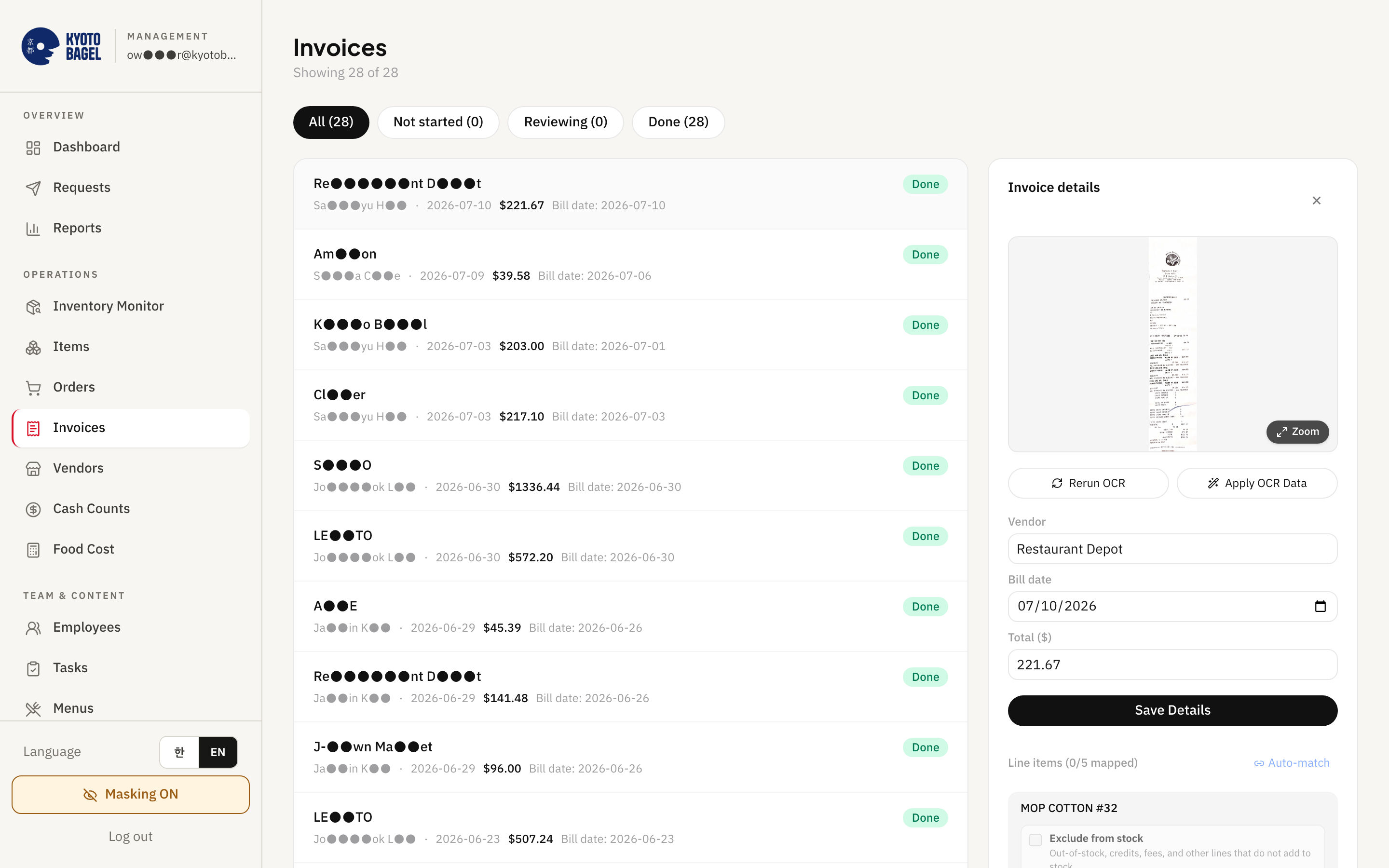
Seenu Store Ops owner dashboard - Invoice review

Invoice review

  • The receipt photo (zoom 50–300%, up to 4 pages) beside the lines the app read: name, qty, unit price, amount.
  • Header read too: vendor, date, amount, previous balance, total due.
  • "auto" tag on lines matched from past invoices; link the rest to your items once and it remembers.
  • Finalize: quantities go into stock, prices into history.

Act

Order, price, and set what your staff see - from the same screens.

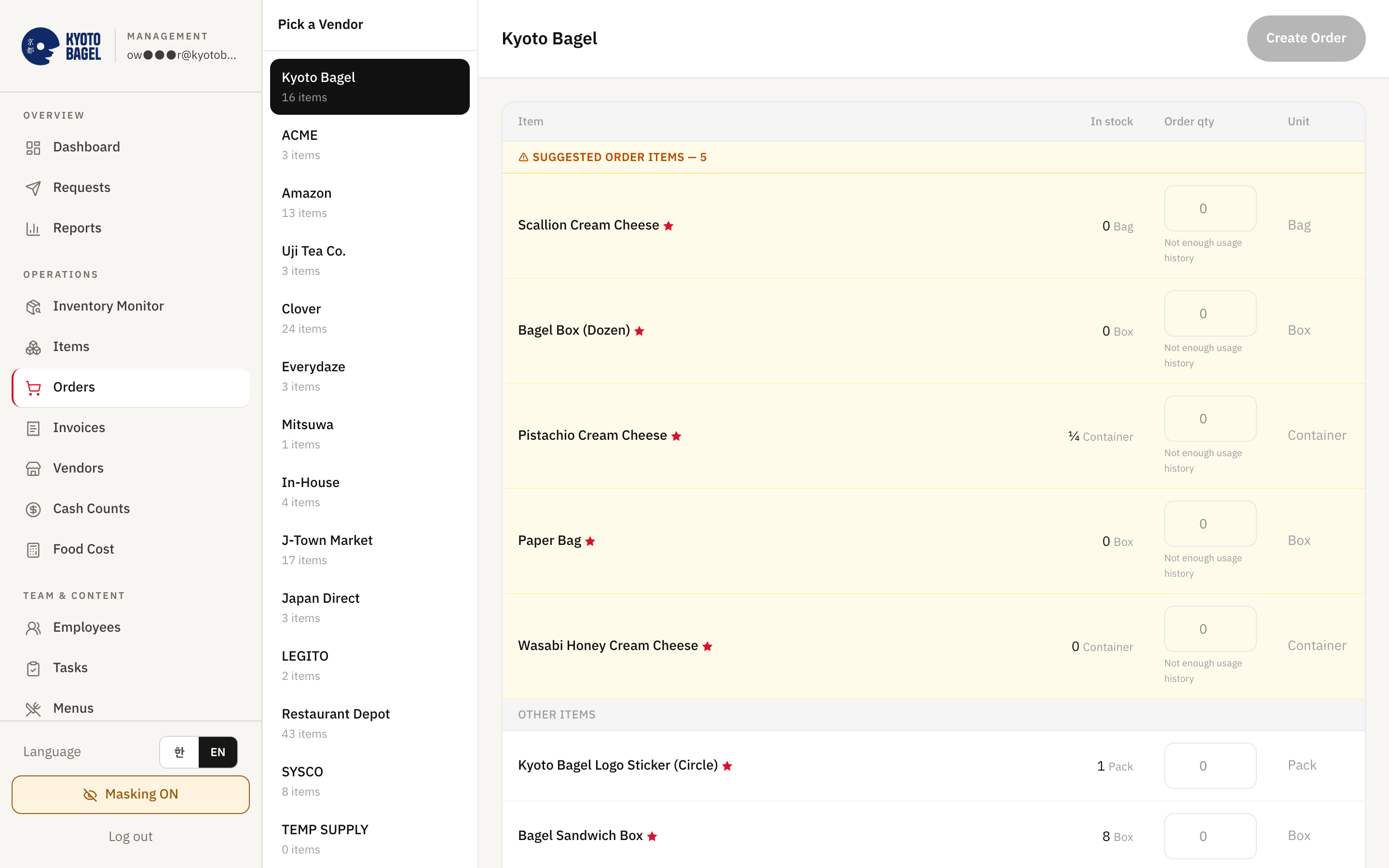
Seenu Store Ops owner dashboard - Orders and the vendor thread

Orders and the vendor thread

  • Per vendor: its items with current stock and a suggested quantity for anything low ("suggest N cases").
  • Create the order; send the text from the system, from your own phone, or copy it.
  • Open a sent order to read the whole conversation with the vendor (add-on; included in Pro).
  • Last 20 orders with status and time.
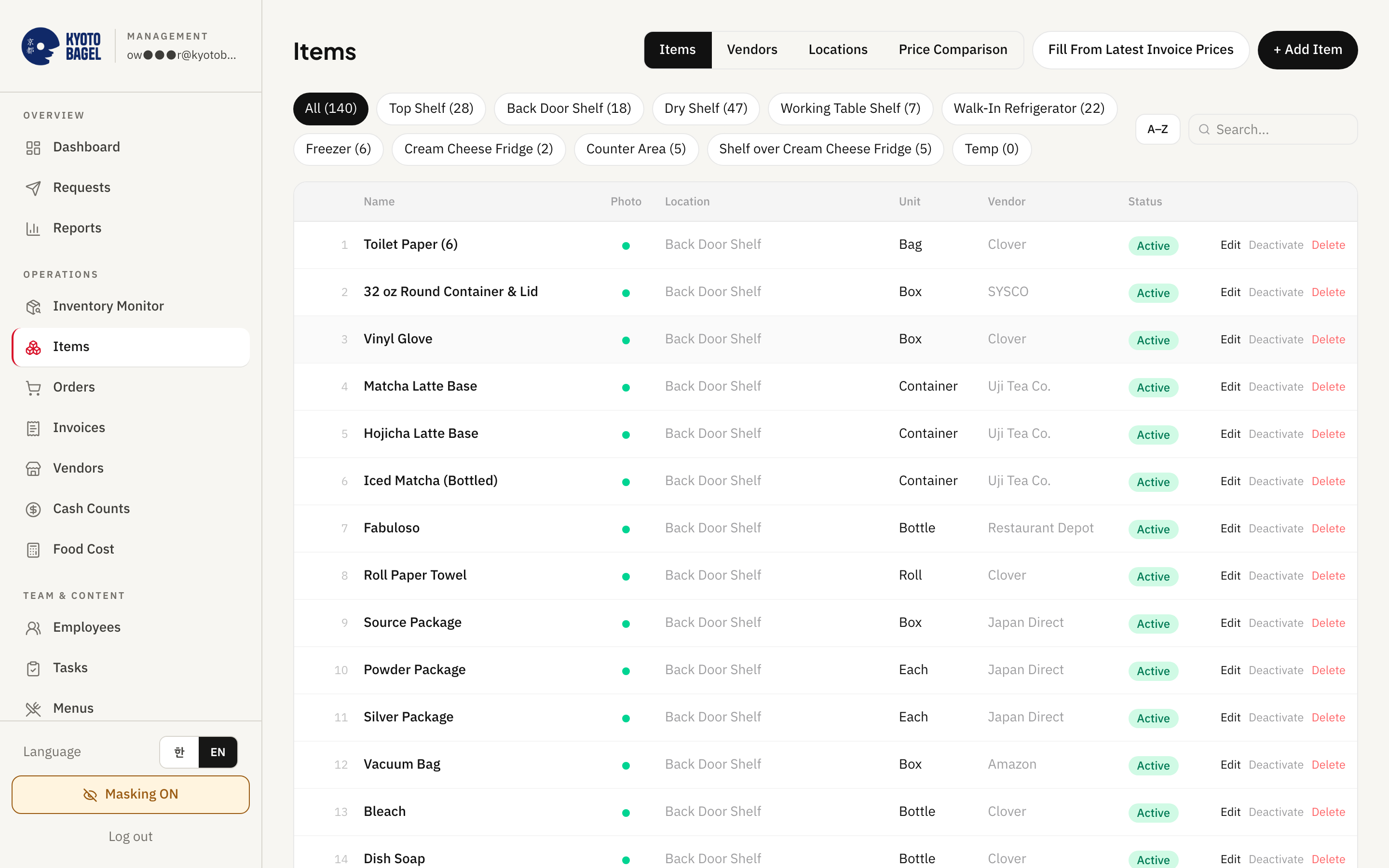
Seenu Store Ops owner dashboard - Items

Items

  • Add, edit, deactivate items; set the reorder threshold; product photo and a counting note for staff.
  • Up to 9 purchase sources per item with price, unit, pack size, vendor code.
  • Shelf locations you define become the staff count tabs.
  • Fill blank prices from the latest invoices in one click.
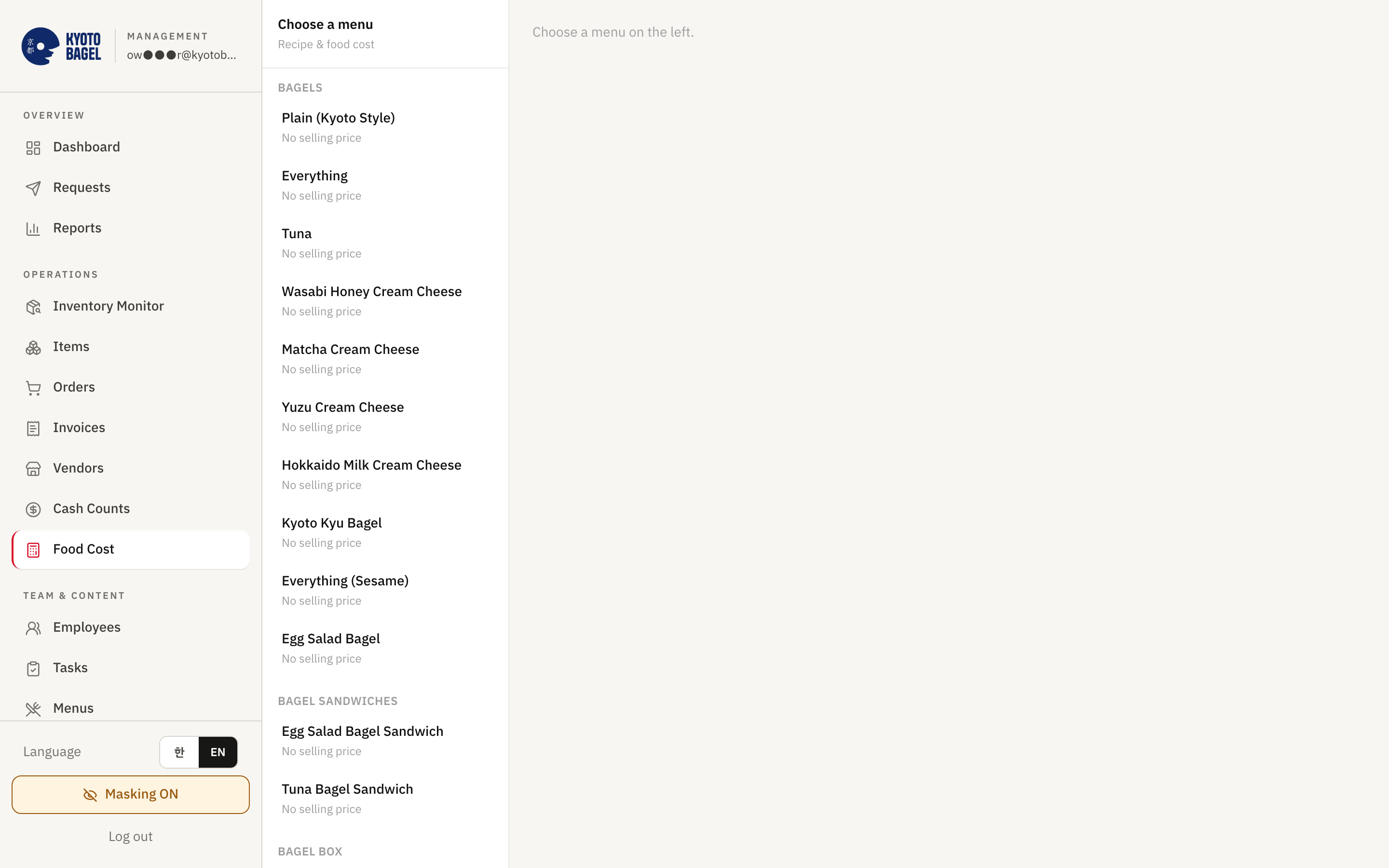
Seenu Store Ops owner dashboard - Food cost

Food cost

  • Menus by category with selling price.
  • Per menu: ingredient cost, cost % (red above 33%), margin in dollars.
  • Build the recipe from your inventory items; change the price and watch the margin move.
Seenu Store Ops owner dashboard - What your staff see

What your staff see

  • Employees: names and PINs, activate / deactivate.
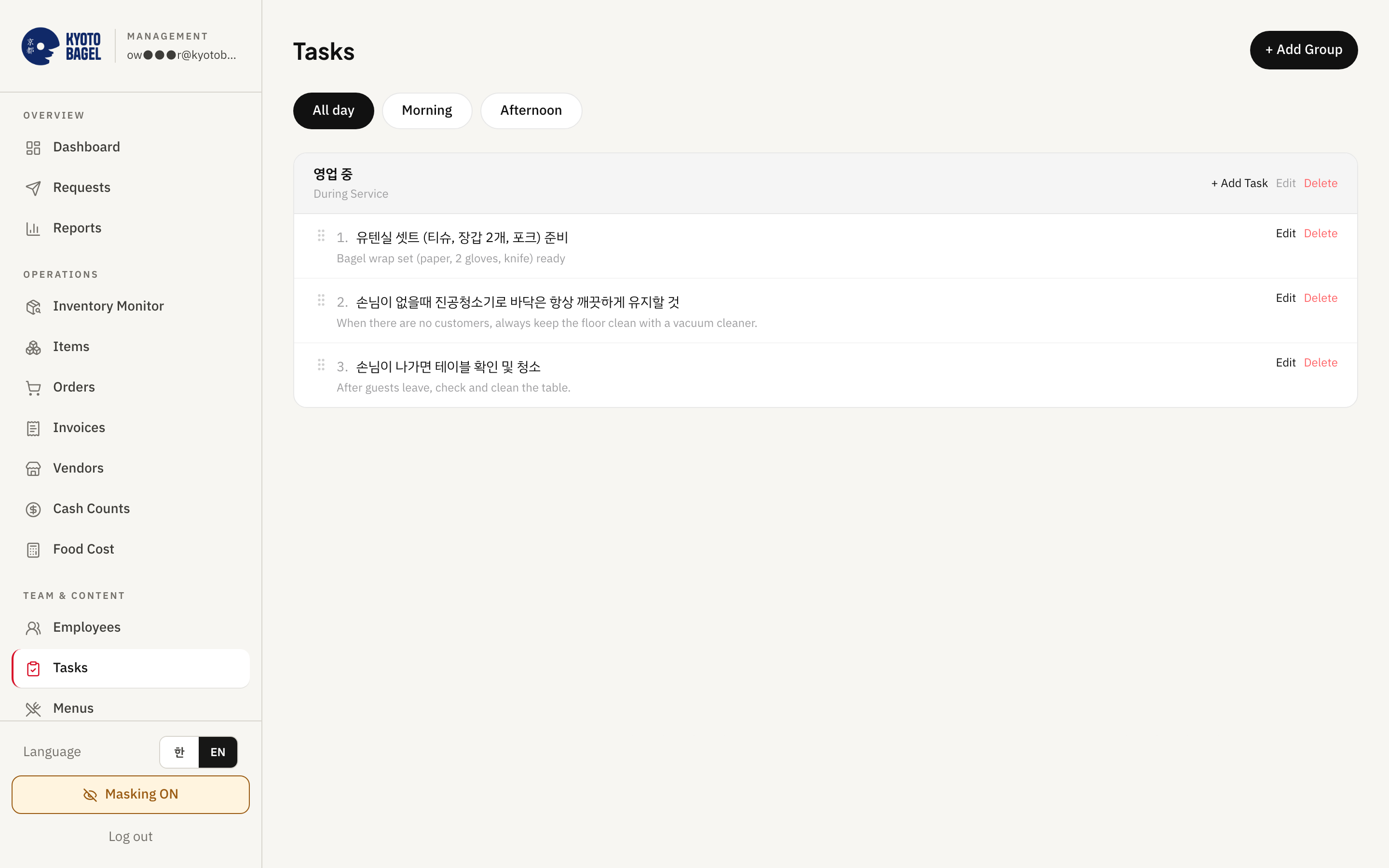
  • Tasks: checklist groups by shift, English auto-translated, drag to reorder.
  • Menus, SOPs, Guides, Contacts, Counting guide - written once, shown to staff in their language.
  • Generate a manual from a topic; print the counting guide as a PDF.

What reaches your phone without anyone doing anything

Email / textWhenWhat it says
Daily close emailEvery day, 10 PMSeven rows: counts submitted, cash counts, tasks done X of Y, open requests, invoices to review, items near reorder, price-increase warnings. A red warning if yesterday's report did not go out.
Reorder alertDaily at noon, only when something is lowLow items grouped by vendor with an estimated quantity and a "go to orders" button.
Staff requestImmediatelyEmployee name, time, message.
Vendor reply by text (add-on)Immediately"[Store] order reply - Vendor: …" forwarded to your phone.

All 17 screens

Overview

  • Dashboard
  • Requests
  • Reports

Operations

  • Inventory monitor
  • Items
  • Orders
  • Invoices
  • Vendors
  • Cash counts
  • Food cost

Team & content

  • Employees
  • Tasks
  • Menus
  • SOPs
  • Guides
  • Counting guide
  • Contacts

Plus a masking switch that hides names and PINs for demos, and a language switch (English / Korean) in the sidebar. On Pro, Simplin adds shifts next to counts and closes.

What your staff do on the iPad or phone

Five screens. A new hire does this on day one.

PIN login, no passwords. English, Spanish or Korean, chosen at login. Everything they do here is what you see above.

Seenu Store Ops - Inventory count by shelf, with ¼ ½ ¾ fractions.
Count a shelf: ± and ¼ ½ ¾, with the counting photo and last price beside each item.
Seenu Store Ops - Opening and closing checklist - a line can require a photo.
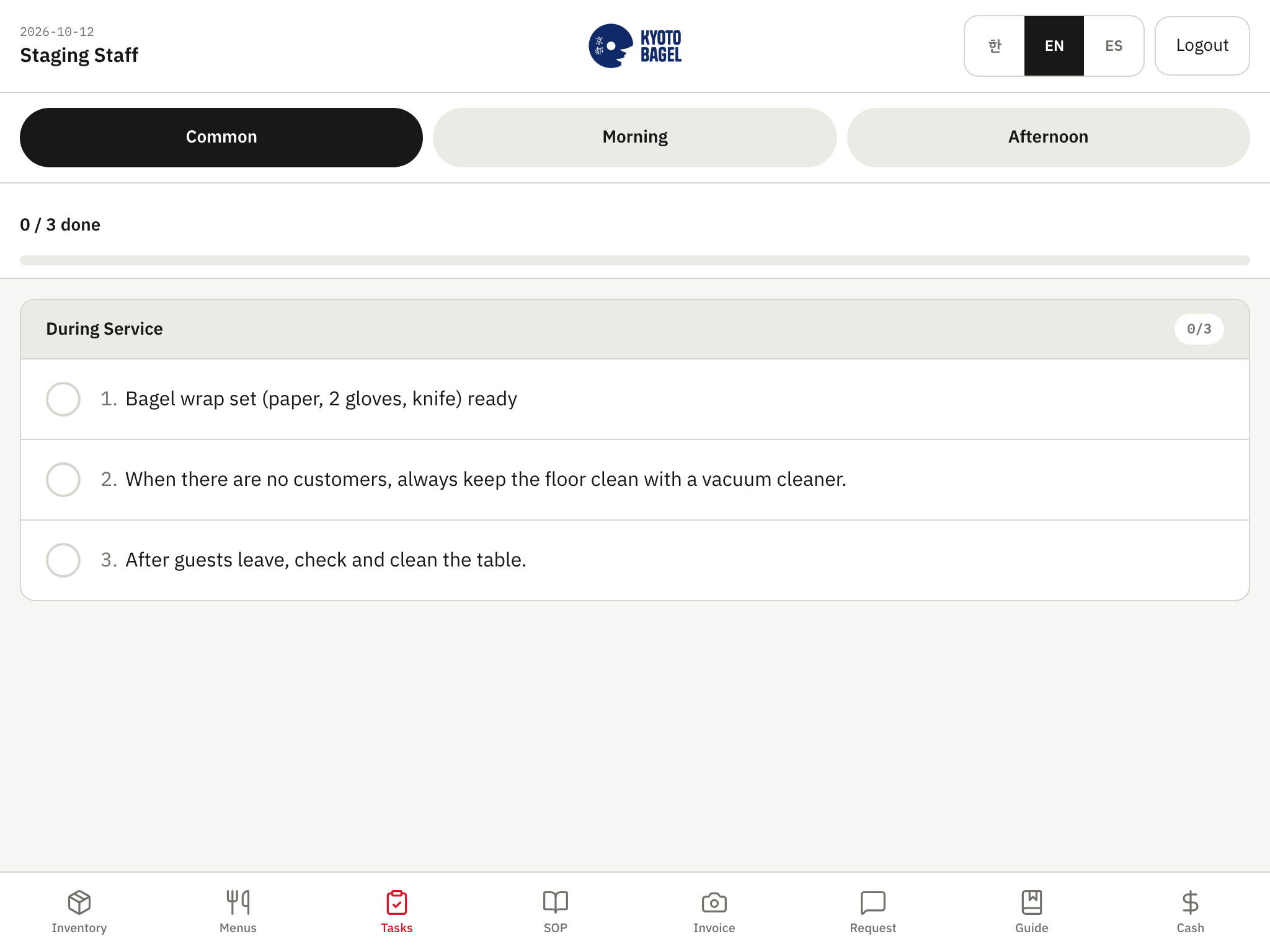
Tick the shift checklist: all day, morning, afternoon. A line can require a photo.
Seenu Store Ops - Cash close - bills by denomination and coin rolls.
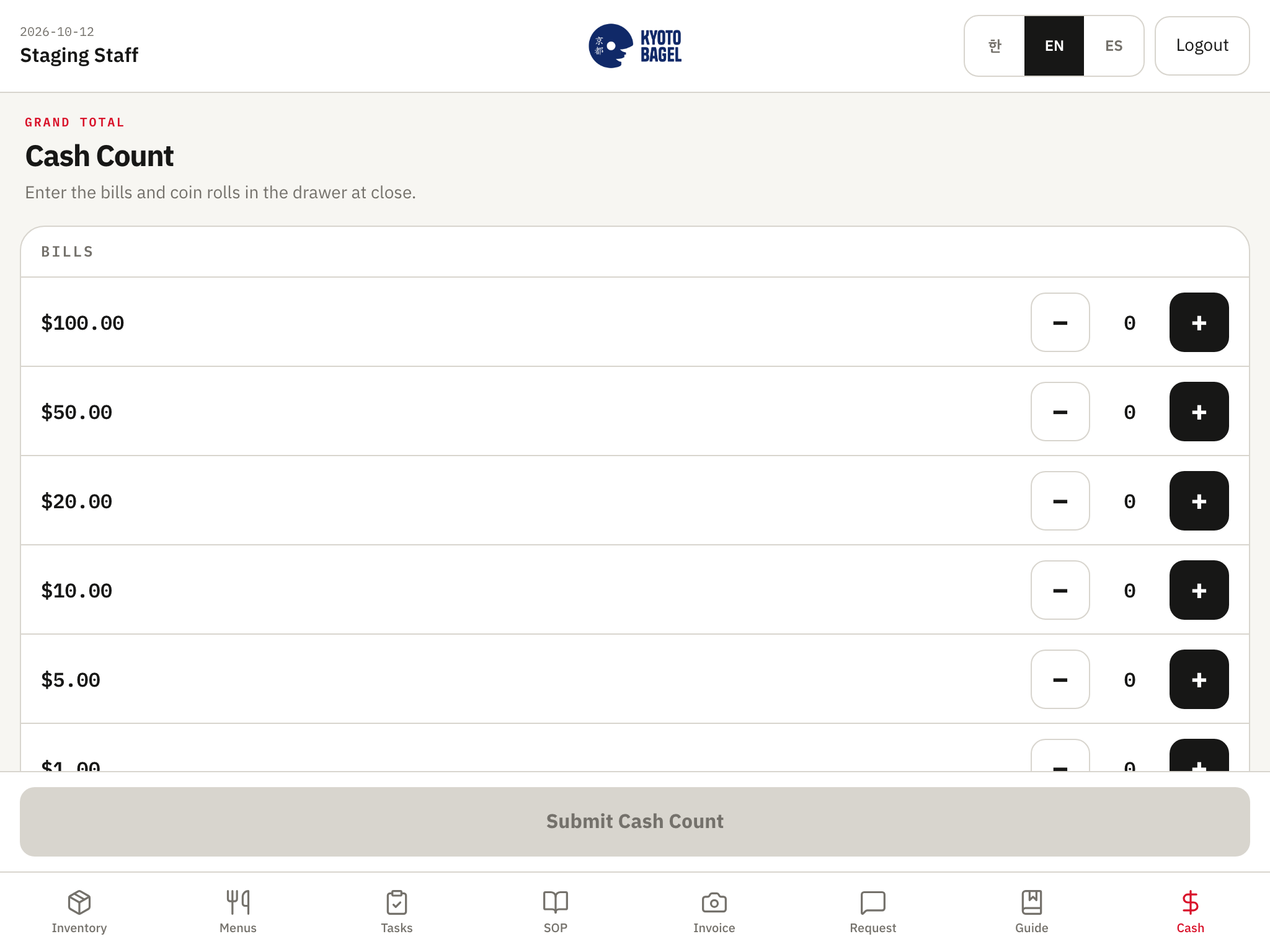
Close the drawer: bills by denomination and coin rolls. The daily close email goes to you.
Seenu Store Ops - Invoice photo - up to 4 pages; the app starts reading the lines at once.
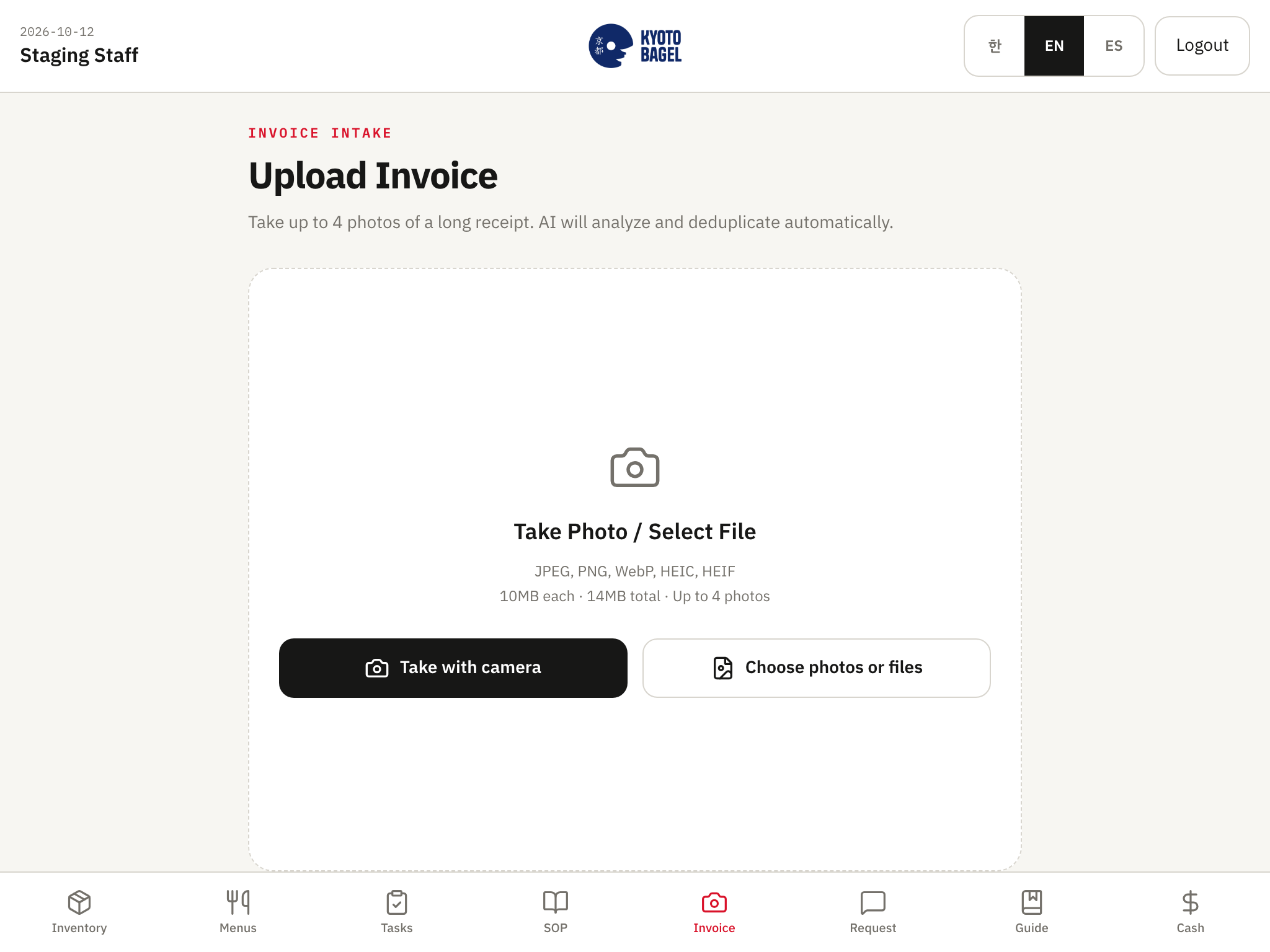
Photograph the delivery invoice, up to 4 pages. The app starts reading the lines at once.
Seenu Store Ops - SOP library in English, Spanish, or Korean.
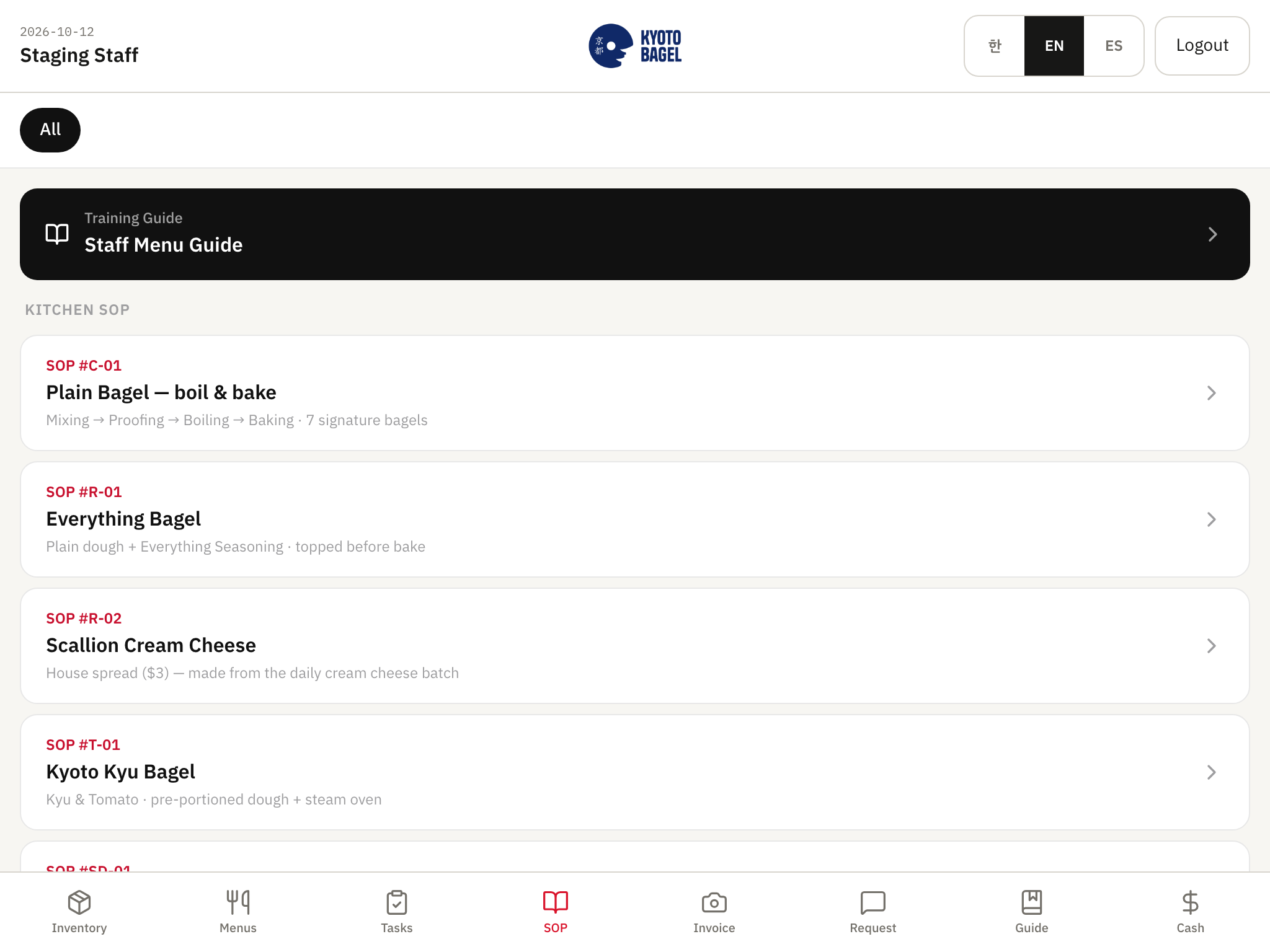
Read menus, SOPs, guides and contacts in their language. Send you a request; it arrives by email.

Five losses, two sides

Staff do it on the iPad. You see it on your phone.

The comparison is paper and a group chat. Here is what the app does that paper cannot.

01

The drawer is short and nobody knows why.

Staff → Count the drawer on the iPad at close: bills by denomination, coin rolls.

You → Cash counts screen: the last 90 closes with the total and who counted. The 10 PM email shows cash counts and open requests.

Seenu Store Ops - Cash close - bills by denomination and coin rolls.
Staff: Cash close - bills by denomination and coin rolls.
Seenu Store Ops - Cash counts - the last 90 closes by denomination and employee.
You: Cash counts - the last 90 closes by denomination and employee.
02

You ran out of something on a Friday night.

Staff → Count the shelf in the order it is stored, ¼ ½ ¾ a tap each.

You → Inventory monitor: estimated on hand per item, low items in red. Noon email lists what is low, by vendor, with a quantity.

Seenu Store Ops - Inventory count by shelf, with ¼ ½ ¾ fractions.
Staff: Inventory count by shelf, with ¼ ½ ¾ fractions.
Seenu Store Ops - Inventory monitor - last count, received since, estimated on hand.
You: Inventory monitor - last count, received since, estimated on hand.
03

You ordered too much and threw it away.

Staff → Keep counting; every count adds to the item's history.

You → Item history: usage per day, "order about every N days". Orders: suggested quantity = 7 days of cover + 2 days lead − on hand.

Seenu Store Ops - Inventory count by shelf, with ¼ ½ ¾ fractions.
Staff: Inventory count by shelf, with ¼ ½ ¾ fractions.
Seenu Store Ops - Orders - suggested quantities per vendor and the text thread.
You: Orders - suggested quantities per vendor and the text thread.
04

A vendor raised a price and you did not notice.

Staff → Photograph the invoice at the back door. Done.

You → Invoice review: lines read and matched to your items. Dashboard price watch flags any line up 10% or more over the typical of the last 6 purchases.

Seenu Store Ops - Invoice photo - up to 4 pages; the app starts reading the lines at once.
Staff: Invoice photo - up to 4 pages; the app starts reading the lines at once.
Seenu Store Ops - Price comparison - saved, latest, average, lowest, highest per vendor.
You: Price comparison - saved, latest, average, lowest, highest per vendor.
05

The inspector shows up and the log is missing.

Staff → Tick the opening and closing checklist; photo where required. Read the sanitation SOP in their language.

You → Dashboard: tasks done X of Y today. Tasks screen: every group by shift. Temperature logs are on the roadmap, not in the app yet.

Seenu Store Ops - Opening and closing checklist - a line can require a photo.
Staff: Opening and closing checklist - a line can require a photo.
Seenu Store Ops - Tasks - checklist groups by shift, Korean and English side by side.
You: Tasks - checklist groups by shift, Korean and English side by side.

What it could free up

Your numbers, our assumptions, no promise.

Type what your back of house costs you today. Every multiplier is shown under "assumptions" and you can change it. Seenu has not measured savings at any client; the disclaimer under the result says so.

Hours per week you or a manager spend on…

Greyed rows need Plus or Pro - and every plan has them for the first 90 days.

Hours freed per month
26 hours a month
Dollars per month, expected
$1,624
Floor (half the expected)
$812
Staffing
3 shifts a month you no longer have to cover · 0.2 of a full-time position
What Plus costs, all-in
-$179 a month
Setup, once
$4,500 3 × $1,500 or 6 × $750
Payback on the setup
3.1 months

These are your numbers and our assumptions, not a promise. We have not measured savings at any client yet; the first case study will replace the assumptions with real figures.

Run it on a real counter →

Bring your real numbers to the walkthrough; we will run them in front of you.

A day off

Can I take a day off?

The question behind every software pitch. From the couch you get:

  • The 10 PM email: counts, cash, tasks X of Y, requests, invoices waiting, items low, prices up.
  • Checklist lines that required a photo - the closed fryer is on record, not on trust.
  • Who did what and when, on every count, close and checklist.
  • Staff requests by email the moment they are sent.

New hire, day one

If staff won't use it, it's dead.

Turnover in this industry is 70%+ a year (2026). The staff app is built for the person who started this morning.

  • PIN login. No passwords, no email accounts, no app store (Pro adds a store-branded app).
  • English, Spanish, or Korean - each person picks at login.
  • 48px buttons, one job per screen, counts in the order the shelves are stored, with a photo of what to count.
  • A new hire counts a shelf on day one without you standing there.

How the setup works

Store Ops Weeks: a week of us in your store.

One setup for every plan - $4,500, 2–4 weeks, 5 days on site, a written Store Ops Report. 3 × $1,500 or 6 × $750. The same shape before opening day for new restaurants.

Week 1

Remote build

Your private system, data loaded from your lists (photos are fine), owner login, staff PINs. Twilio verification starts here if text ordering is included.

Week 2

Five days on site

We work the store open-to-close with your staff and set the system to how the store really runs.

  • Day 1Shelves and the first count - we set shelf locations to how the store is stored and count with your staff.
  • Day 2Checklists and the first close - opening/closing lines, photo requirements, the cash close.
  • Day 3Deliveries, invoices and thresholds - photograph the day's invoices, match lines, set reorder points.
  • Day 4Vendors, orders and Simplin tap-in - order templates, suggested quantities, staff clock in by NFC.
  • Day 5Your staff run it alone; we watch and fix. A 30-minute owner meeting every evening.
Weeks 3–4

Adjust, train, report, go-live

Adjustments from the on-site week, training sessions, go-live with staff doing the first real count and close, handoff - and the written Store Ops Report.

Day 75

Trial review call

A one-page "what you actually used" summary of the Pro trial and a recommendation.

Day 90

Your choice

Stay on Pro, or go to the plan you signed. Nothing switches up without a yes.

A 30-minute owner meeting every evening.

I'm opening one

You don't have a list yet. We build it with you.

The Opening Kit ($1,500, included in Pro) starts from a concept template - QSR, café, or full service - so you are not inventing a system while you chase permits. The on-site week of Store Ops Weeks becomes your opening week.

Weeks −4 to −3

Concept template → your lists and checklists

Item list with shelf locations, vendor list, par levels, opening/closing checklists - from a template for your concept, edited with you.

Weeks −2 to −1

Five SOPs and the remote build

Prep and cooking SOPs for your five core items in English, Spanish and Korean; your private system built and loaded; first hires get PINs.

Opening week

Five days on site

We are in the store open-to-close with your first team while the doors open: shelves, first count, checklists, first close, invoices, vendors, Simplin.

Weeks +1 to +2

Adjust, train, report

Adjustments from the opening week, training, handoff and the written Store Ops Report.

Start six weeks out and the lists, SOPs and system are ready before the doors open.

What it does not do

Say it before you ask.

  • No POS integration. It runs beside Square, Toast, Clover, or no POS, and never reads sales data.
  • No offline mode. The app needs a connection; if the kitchen Wi-Fi drops, counts wait until it is back.
  • No temperature logs yet. On the roadmap.
  • No hardware. Use the iPad or Android tablet you already have.
  • Time clock, schedules and payroll export are Simplin - inside Pro, and in the 90-day trial for every plan; not in Core or Plus after that.
  • No task completion history per employee - only "X of Y done today".
  • Cash counts and Reports have no in-app export; the Google Sheet is the cash export (Plus and Pro).
  • Orders history shows the last 20 only; unsent drafts cannot be reopened.

Pricing

One setup. Three monthly prices. Nothing else to pay.

Pricing

One setup for every plan: $4,500

2–4 weeks5 days on sitea written Store Ops Report3 × $1,500 or 6 × $750

  • Week 1, remote: private build, data loaded from your lists, owner login, staff PINs.
  • Week 2, on site for five days: we work the store open-to-close with your staff - counts, closes, invoice photos, orders - and set shelves, thresholds and checklists to how the store really runs. A 30-minute owner meeting every evening.
  • Weeks 3–4, remote: adjustments from the week, training sessions, go-live with staff doing the first real count and close, handoff.
  • A written Store Ops Report: three pages - what we saw, what we changed, what to do next.

Core

$129a month, all-in · per location

Plus

$179a month, all-in · per location

Pro

$279a month, all-in · up to 3 locations

Pro: Simplin (time clock, schedules, payroll export, team chat), your own app in the App Store and Google Play, and the Pro-only services.

First 90 days: everyone runs the Pro software at their own plan's price. On day 75 we show you what you used; you choose.

Hosting, database, email, invoice reading, monitoring, backups and monthly updates are included. Month-to-month, 30 days' notice.

Monthly care keeps it running, safe, improving and answered — stop paying and the code and data are still yours.

Exit guarantee in the agreement: on cancellation you get the code and a full database export within 7 days, and we delete our copies.


Your data, your exit

Private by design. Written into the contract.

Managed is the default: we run it on our accounts and you get one bill. Self-owned puts every account in your name from day one for $45 less a month, plus about $47–57 a month paid to the vendors directly. Simplin is run by Seenu Tech. Your staff and payroll data there are covered by the same privacy promise and are exported to you on exit. Simplin's own public price is $20 per store per month; Pro includes it.

  • One private database and one private deployment per restaurant. Nothing is pooled, benchmarked, resold, or shown to any other business.
  • Seenu staff see your data only while doing support work you asked for.
  • Your login is the only owner login. Staff see only what their PIN allows.
  • Invoice photos and cash counts stay in your restaurant's own private storage.
  • Exit guarantee: the code and the full database go to you within 7 days of cancellation; we delete our copies.
Seenu Tech

See it live

Tell us about your restaurant and we will set up a walkthrough - a video call where we open our own store's dashboard, or a visit to our store in Fort Lee, NJ.

hello@seenutech.com

Hosting, database, email, invoice reading, monitoring, backups and monthly updates are included. Month-to-month, 30 days' notice. See pricing and plans →

No sales pressure. If paper is enough for your store, we will tell you.